
AI Dog Portrait From an Old or Blurry Photo
AI can work with an old or blurry dog photo, but it cannot invent detail that was never captured. Painterly styles like watercolor and oil hide softness best, while realistic styles expose it. Crop close on the face, pick the sharpest frame you have, and expect a likeness rather than a perfect match.

Yes, you can make an AI dog portrait from an old photo or a blurry one. The honest catch is that the result depends on what the original photo actually captured — the model works around softness, but it can't invent detail that was never there.
The distinction matters, so let's be clear about it up front. If your dog's eyes are visible in the old photo but a little soft, the AI can render them cleanly. If the eyes are a smeared blur with no shape at all, the AI has to guess — and a guess looks like a generic dog, not yours.
This guide covers getting the most out of the photos you actually have. Not the ideal shoot you can't do anymore. The 2014 phone picture, the screenshot from a group chat, the one printed photo you scanned. Here's what works.
Old Photos at a Glance
| Your photo | What to expect | What to do |
|---|---|---|
| Eyes visible but soft | A clean, recognizable face | Watercolor first, then compare |
| Face about 30 px wide | A generic dog of the right breed | Find a closer shot if one exists |
| Screenshot from a chat | About half the original pixels | Upload the original file instead |
| 700 px scan of a print | Enough for an 8 × 10 in (20 × 25 cm) watercolor | Crop tight to head and shoulders |
| Sharpened or upscaled copy | Halos and fake texture copied into the art | Use the untouched original |
Can AI really fix a blurry dog photo?
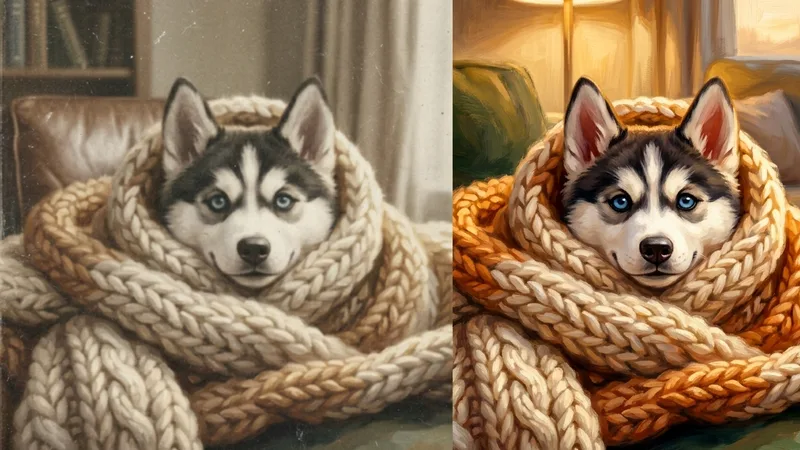
AI cannot truly fix a blurry dog photo, and the distinction matters. It cannot recover detail the camera never recorded — a 400 px face has no fur texture stored in it to bring back. What it can do is generate a new image in a style where that missing detail was never expected, which is why painterly styles rescue old photos and realistic ones expose them.
An AI portrait generator doesn't restore your photo the way a repair tool sharpens pixels. It reads the features it can find — eye shape, ear position, muzzle length, coat color, that patch of white on the chest — and paints a fresh portrait from them. Softness in the original gets smoothed over because the new image is drawn from scratch, not upscaled.
So a slightly blurry photo often comes out great. The model has enough to work with, and the artistic style hides what's missing.
Where it struggles is missing information, not soft information. If the old photo was taken from across the yard and your dog's face is thirty pixels wide, there simply isn't enough there. The AI will produce a nice-looking dog, but the specific details that make it your dog may not survive.
That's the real question behind every AI dog portrait old photo search: not "can it make art," but "will it still look like my dog." For more on why the source photo sets the ceiling, our guide on how AI dog portrait generators work walks through the mechanics.
Which styles handle an old photo best?
Style choice is the single biggest lever you have with a poor photo. Watercolor, impressionist and cartoon all convert softness into a deliberate look, so blur reads as brushwork. Oil sits in the middle. Realistic is the one to avoid entirely, because it promises detail your photo cannot supply and the gap shows immediately.
Forgiving, painterly styles win with rough photos. They aren't trying to reproduce photographic sharpness, so they absorb the flaws instead of exposing them.
-
Watercolor is the most forgiving of all. Soft edges and blended color are the whole point of the style, so a soft original blends right in. If you have one shaky old photo, start here. Our watercolor dog portraits guide covers the look in depth.
-
Oil painting adds texture and depth that reads as intentional artistry, not lost detail. It's a strong choice when you want something that looks framed-and-formal from a photo that's less than perfect.
-
Sketch and pencil styles work for the same reason — line and shading forgive a lot, and a little grain in the source disappears entirely.
Realistic styles are the harder ask. They try to render crisp, photographic detail, which means they need crisp detail to start from. Feed a blurry photo into a realistic style and the softness tends to show. Save realistic for your sharpest source, and lean on artistic styles for everything else. If you want a full tour of the options, see our dog portrait styles explained breakdown.
How do I get the best result from a bad photo?
Four small moves make a real difference with an old photo, and none need editing skills. Crop tight to the head and shoulders so the face fills the frame. Pick the sharpest frame you have, even if the composition is worse. Upload the original rather than a screenshot — a screenshot typically loses half the pixels. And skip any sharpening or upscaling. Even a 700 px photo can make a good 8 × 10 in (20 × 25 cm) watercolor print.
Crop to the clearest part of the face. The face carries the portrait. If the sharpest thing in your old photo is your dog's head, crop tightly around it before uploading. A small, clear crop of the face beats a large photo where the face is one soft element among many.
Pick the sharpest of several old photos. If you have a handful of images from the same era, don't just grab the first one. Zoom in on each and compare the eyes specifically. The photo with the clearest eyes almost always produces the best portrait, even if another shot has a cuter pose.
Don't pre-sharpen or upscale it. This one surprises people. Running an old photo through a sharpening filter or an AI upscaler first usually adds artifacts — halos, fake texture, blocky edges — and the portrait generator then faithfully copies those flaws. The raw original, soft as it is, gives cleaner results than a "fixed" version.
Try more than one source photo. Generation is fast and cheap, so experiment. Different photos highlight different features, and the portrait from an unexpected shot sometimes captures your dog better than the one from your favorite. For a deeper checklist on picking source images, see best dog photos for AI portraits.
What are the honest limits?
Knowing the honest limits before you start keeps the result from disappointing you. AI can produce a portrait that clearly reads as your dog's breed, coloring and general character from a poor photo. It cannot reproduce the exact markings, the precise eye color, or a specific expression if none of those were captured. Expect a likeness, not a match.
The AI can work around softness, low light, and mild blur. It can rebuild a clean face from a slightly fuzzy one. It can turn a compressed text-message photo into something worth framing.
AI cannot recover detail that the camera never captured. If an ear is completely out of frame, the AI invents one. If the face is turned away, it can't show you the front. If the image is so small or so blurred that the eyes have no shape, the portrait becomes a plausible dog rather than a faithful one.
The practical takeaway: judge your source photo by whether you can still tell it's your dog. If the features are recognizable to you, even softly, the AI usually has enough. If even you have to squint to be sure, set your expectations accordingly and lean hard on a forgiving style.
Old photos of a dog who has passed
Old photos of a dog who has passed are where all of this matters most. There is no reshoot, and the photo you have is the photo you will always have. Choose a painterly style — watercolor or soft oil — crop to the face, and accept a gentle likeness rather than chasing exactness the file cannot deliver. Generating takes 1–2 minutes, so trying 3 styles from the same old photo takes about five minutes.
When a dog is gone, you don't get to take a better photo. You work with what survived — the blurry ones, the group shots, the low-resolution files from an old phone. That's exactly the situation these tools were made for, and a soft old photo is nothing to apologize for.
A forgiving style tends to feel right here too. Many people find watercolor or oil gentler to look at every day than a sharp, literal rendering. It captures the dog's presence without being a photograph you have to brace for. Our pet memorial portraits guide goes deeper on choosing a style, a photo, and a way to display the finished piece.
If your only images are imperfect, that's normal, and it doesn't mean you've missed your chance. It means you use the tips above — crop to the clearest face, compare your options, skip the pre-sharpening — and give the model a fair shot at bringing that old photo back as something you'll want on the wall.
The bottom line
An old or blurry photo is a fine starting point for an AI dog portrait, as long as the features are still recognizable and you pick a style that forgives the flaws. Crop tight, use your sharpest source, don't over-process it, and try a couple of options.
You can test it without committing much. The portrait generator starts at a $1 trial (then $19.99/month for unlimited portraits, cancel anytime), so you can upload that rough old photo, try watercolor and oil, and see for yourself how it comes out before deciding anything.
Ready to try it with your own photo? Start with the generator and see what an old photo can become.
