
How AI Dog Portrait Generators Work: The Tech Behind the Art
An AI dog portrait generator uses a diffusion model: it starts from noise and refines it step by step toward an image, guided by your photo and the style you chose. It does not paste your dog onto a template. The source photo drives resemblance, which is why photo quality decides most of the result.

Upload a phone photo of your dog, pick "Renaissance," wait a minute or two, and get back an oil painting that somehow still looks unmistakably like your dog. It feels like magic. It isn't. Understanding how AI dog portrait generators work takes the mystery out of it — and, more usefully, tells you exactly how to get a better result.
The short version: the generator uses a type of AI called a diffusion model, trained on millions of images, to repaint your dog in a new style while holding onto the features that make your dog recognizable. This guide walks through what actually happens under the hood, in plain language, and why a few things you control matter more than the style you pick.
At a Glance
An AI dog portrait generator runs a diffusion model: it starts from random noise and refines it step by step into an image, guided by your photo and the style you picked. It does not paste your dog onto a template. Your source photo drives the resemblance, which is why photo quality decides most of the result.
| Portrait detail | What to know |
|---|---|
| The technology | Diffusion models that refine noise into an image |
| What drives resemblance | Your source photo, not the style |
| What it does not do | Paste your dog onto a template |
| Biggest quality factor | Photo sharpness and lighting |
| Time to generate | 1–2 minutes from one photo |
| Output resolution | Print-ready at 300 DPI |
| How it works | Refines noise into an image |
| Source photo minimum | About 1500 px on the long edge |
| Trial cost | $1 for 3 days |
What Actually Happens When You Upload a Photo?
Two separate jobs run when you upload a photo, not one. First the model reads the image and encodes what makes your dog that dog — face proportions, coat color and pattern, ear set, expression. Then it generates a new image from noise, steering each refinement step to keep matching that encoding while applying the style you chose.
First, the system reads your photo. It identifies the dog, locates the face, and extracts the features that define this specific animal — the shape of the snout, the set of the eyes, the color and pattern of the coat, the ear position. This is the part that makes the output look like your dog rather than a generic one.
Second, it generates a brand-new image in the style you chose, using those extracted features as a guide. Crucially, it isn't pasting a filter over your photo or copying pixels. It's painting a fresh image from scratch, constrained to look like your dog in the requested style. That distinction is the whole reason modern results look like real art instead of a warped snapshot.
Diffusion Models, in Plain English
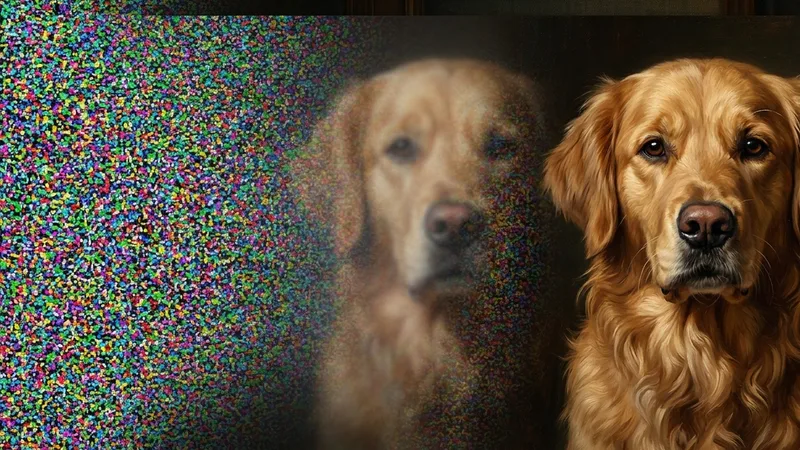
A diffusion model is the engine behind almost every good AI portrait tool, and the idea works without any math. The model was trained by watching millions of images get progressively destroyed by noise, learning to reverse each step. Generation runs that training backwards: start with pure noise, remove a little at a time, and an image emerges.
The model was trained by taking millions of real images, gradually adding random noise until each one became pure static, and learning — step by step — how to reverse that. In other words, it became extremely good at turning noise back into a coherent image.
To make your portrait, the generator starts with a field of random noise. Then it "denoises" that static in steps. At each step, two things steer it: the features read from your dog's photo, and the style you asked for.
Over a couple dozen steps, the noise resolves into a finished painting — one that satisfies both constraints at once, this dog in that style. Think of it less like a photocopier and more like an artist. One who studied millions of paintings, and can now paint your dog in any of them from memory.
Why Does the Source Photo Matter So Much?
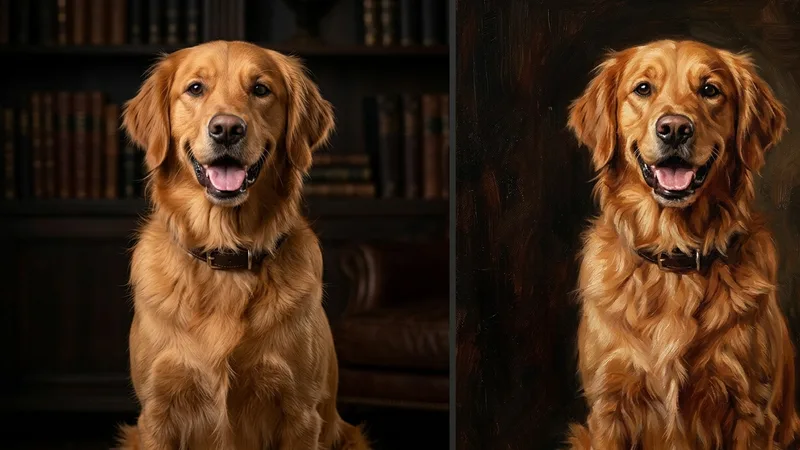
This is the single most useful thing to understand, and it follows directly from how the technology works: the model can only preserve what it can actually see in your photo.
If the face is sharp and well-lit, the model has clear features to lock onto, and the portrait comes out looking like your dog. If the photo is blurry, dark, or shot from across the room, the model has to guess — and its guesses fill in with generic dog features. That's why two people using the exact same generator and style can get wildly different quality: the difference is almost always the input photo, not the tool.
A few practical consequences:
-
A clear, front-facing, well-lit face beats everything else. Our guide to the best photos for AI portraits covers exactly what to look for.
-
Cropping close on the face helps — it gives the model more detail to read and less background to get distracted by. Aim for at least 1500 px on the long edge after cropping.
-
Don't pre-edit heavily. Aggressive sharpening or AI-upscaling before you upload often adds artifacts the model then faithfully reproduces. The clean original usually wins. For staging a shot, the dog photography tips piece goes deeper.
How Does the Model Keep It Looking Like Your Dog?
The "looks like my dog" part comes from conditioning — the technical term for steering the generation with your specific input rather than letting it invent a random dog.
Good generators pay special attention to the face and to distinctive markings, because that's where recognition lives. A brown patch over one eye, a graying muzzle, a particular ear fold — these are the anchors.
The style layer — oil, watercolor, royal and Renaissance, cartoon — is painted around those anchors. That's why you can change the whole artistic treatment and still recognize the dog underneath. To see how the same dog reads across styles, our dog portrait styles guide lays them out side by side.
What Can AI Not Do Yet?
AI portrait generators still fail in predictable ways, and knowing them is part of using the tool well. They struggle with several dogs in one frame, with unusual or asymmetric markings, with text and collars and tags, and with any detail the source photo never captured. None of these are settings you can change — they are limits of the approach.
It sometimes gets details wrong. Occasional oddities with paws, an extra whisker, or slightly off eyes happen because the model is generating, not copying. This is why regenerating a couple of times and picking the best is normal practice, not a failure.
Multiple pets in one image are harder. Asking the model to place two specific dogs together, both recognizable, is a genuinely tougher problem than one dog. Often a matched set of individual portraits works better — we cover that in the multiple dogs guide.
It can't invent detail that isn't there. If your only photo is tiny and soft, no AI can truly recover a face that was never captured. Artistic styles like watercolor forgive this better than sharp realistic ones, because they don't promise photographic accuracy.
Knowing these boundaries is exactly why the "generate a few, keep the best" workflow exists — and why it costs so little to do so.
Why This Beats the Old Photo Filters
If you tried "turn my photo into a painting" apps five or six years ago, the results were the crude style-transfer era: they smeared a texture over your photo and called it art. The shapes stayed photographic, the brushwork looked pasted on, and nothing about it read as a real painting.
Diffusion models were the leap. Because they paint a genuinely new image rather than overlaying a texture, the composition, lighting, and brushwork all behave like real art — a portrait that could plausibly hang in a frame, not a novelty filter. That's the difference you're seeing when a modern AI dog portrait actually looks commissioned.
Trying It Yourself
Now that you know how AI dog portrait generators work, the practical takeaway is simple: pick a good photo, and let the model do the rest. Our portrait generator runs on this exact pipeline — start with a $1 trial to see your own dog rendered, and if you want unlimited portraits and styles, the $19.99/month plan covers it, cancel anytime.
The technology is genuinely impressive, but it isn't the hero of your portrait. Your dog is, and the photo you feed it is what lets the model prove it. Turn your dog's photo into art here — and now you know exactly why the photo you choose makes all the difference.
